RxSwift Source Code Reading Part II - Scheduler
someOb
  .observe(on: MainScheduler.instance)
  .subscribe(onNext: { ... })
The .observe(on: MainScheduler.instance) above guarantees that the onNext closure you pass in will be called on the main thread. But how does RxSwift actually achieve this? And when going through the RxSwift API docs, we also see an API called subscribe(on:). These two look similar at a glance—what’s the difference between subscribe(on:) and observe(on:)?
This article will explore these questions from the perspective of the RxSwift source code.
Before We Start
- The code in this article is based on RxSwift 6.5.0.
- This article assumes you have some experience using RxSwift.
- The snippets from the source code shown here omit parts related to debugging, generics, and comments. You can find the complete source on GitHub.
- For convenience, this article will use the words task and
actioninterchangeably. Unless otherwise stated, they refer to the same concept.
ImmediateSchedulerType
To answer the question at the beginning of the article, we first need to start from the root of everything: the Scheduler. In RxSwift, a Scheduler is an abstraction representing dispatching tasks onto specific threads; RxSwift provides multi-threading support through Schedulers.
All Scheduler implementations ultimately derive from ImmediateSchedulerType, which represents a Scheduler that performs scheduling immediately. ImmediateSchedulerType itself is a protocol:
public protocol ImmediateSchedulerType {
    func schedule<StateType>(_ state: StateType, action: @escaping (StateType) -> Disposable) -> Disposable
}
ImmediateSchedulerType defines only one method: schedule(_:,action:). This method takes a parameter of type StateType and an action closure, which itself takes a StateType and returns a Disposable. From the signature we can roughly guess what it does: we pre-supply the “function” action and its corresponding argument state, then ImmediateSchedulerType immediately switches to the corresponding thread and invokes action(state).
ImmediateSchedulerType also has an extension method that provides the ability to schedule tasks recursively:
public func scheduleRecursive<State>(_ state: State, action: @escaping (_ state: State, _ recurse: (State) -> Void) -> Void) -> Disposable {
    let recursiveScheduler = RecursiveImmediateScheduler(action: action, scheduler: self)
    recursiveScheduler.schedule(state)
    return Disposables.create(with: recursiveScheduler.dispose)
}
Looking at the signature: we still pass in a state and an action to be scheduled, but action is a bit more complex now. In addition to the original state parameter, it also takes a recurse closure. The idea is likely this: scheduleRecursive’s own state parameter is the initial argument; when scheduling, it is passed into action. Inside action, we can then pass the state received to recurse to achieve recursion.
The body of this method is not very long; internally it delegates the work to a RecursiveImmediateScheduler instance and calls that instance’s schedule(_:) method to perform scheduling.
The name RecursiveImmediateScheduler clearly hints at its purpose. Let’s look at its implementation:
final class RecursiveImmediateScheduler<State> {
    typealias Action = (_ state: State, _ recurse: (State) -> Void) -> Void

    private var lock = SpinLock()
    private let group = CompositeDisposable()

    private var action: Action?
    private let scheduler: ImmediateSchedulerType

    init(action: @escaping Action, scheduler: ImmediateSchedulerType) {
        self.action = action
        self.scheduler = scheduler
    }

    func schedule(_ state: State) {
        var scheduleState: ScheduleState = .initial

        let d = scheduler.schedule(state) { state -> Disposable in
            if self.group.isDisposed {
                return Disposables.create()
            }

            let action = self.lock.performLocked { () -> Action? in
                switch scheduleState {
                case let .added(removeKey):
                    self.group.remove(for: removeKey)
                case .initial, .done:
                    break
                }

                scheduleState = .done

                return self.action
            }

            if let action = action {
                action(state, self.schedule)
            }

            return Disposables.create()
        }

        lock.performLocked {
            switch scheduleState {
            case .added:
                rxFatalError("Invalid state")
            case .initial:
                if let removeKey = group.insert(d) {
                    scheduleState = .added(removeKey)
                } else {
                    scheduleState = .done
                }
            case .done:
                break
            }
        }
    }

    func dispose() {
        lock.performLocked { action = nil }
        group.dispose()
    }
}
RecursiveImmediateScheduler must be initialized with a concrete ImmediateSchedulerType instance and its corresponding action. When you call its schedule(_:) method, it internally calls scheduler.schedule to perform the actual task scheduling and adds the returned Disposable into an internal CompositeDisposable. Then, when the task actually executes, it first removes the existing scheduled entry, then calls action(state, self.schedule) to invoke its own schedule(_:) method again, achieving recursion.
When does the recursion stop? The answer is: when dispose() is called, because dispose() sets action to nil.
RecursiveImmediateScheduler’s implementation confirms our earlier guess about the scheduleRecursive method’s signature. We can also see that although RecursiveImmediateScheduler is named like a Scheduler, it does not itself implement any of the scheduler-related protocols. Rather, it acts as a decorator for ImmediateSchedulerType, adding recursive scheduling capabilities.
There are a few implementation details worth calling out:
- Since
RecursiveImmediateSchedulermethods may be called on any thread, it uses a lock internally for thread safety. Even though the type is calledSpinLock, it’s actually just a typealias forRecursiveLock. RecursiveImmediateSchedulerusesScheduleStateto ensure resources are released correctly: it transitions throughinitial→added→done. Theaddedstate holds information about the previous scheduling, which is then used when a new round of scheduling starts to release resources from the last round.
Now that we’ve seen the code around ImmediateSchedulerType, let’s look at some of its concrete implementations.
OperationQueueScheduler
OperationQueueScheduler implements ImmediateSchedulerType and is suitable for offloading larger chunks of work to a background queue while allowing you to control the maximum concurrency.
Its internal implementation is simple. Aside from an init method, the only other method is its implementation of ImmediateSchedulerType:
public func schedule<StateType>(_ state: StateType, action: @escaping (StateType) -> Disposable) -> Disposable {
    let cancel = SingleAssignmentDisposable()

    let operation = BlockOperation {
        if cancel.isDisposed { return }
        cancel.setDisposable(action(state))
    }

    operation.queuePriority = queuePriority
    operationQueue.addOperation(operation)

    return cancel
}
OperationQueueScheduler creates a BlockOperation instance, sets its queue priority (passed in at initialization), and puts the actual action invocation inside that BlockOperation. It then adds the operation to the OperationQueue provided at initialization.
CurrentThreadScheduler
CurrentThreadScheduler also implements ImmediateSchedulerType, but it schedules tasks on the current thread. This is also the default Scheduler used by operators like map and filter that produce elements.
Let’s look directly at the implementation of its schedule(_:,action:) method:
public func schedule<StateType>(_ state: StateType, action: @escaping (StateType) -> Disposable) -> Disposable {
    if CurrentThreadScheduler.isScheduleRequired {
        CurrentThreadScheduler.isScheduleRequired = false

        let disposable = action(state)

        defer {
            CurrentThreadScheduler.isScheduleRequired = true
            CurrentThreadScheduler.queue = nil
        }

        guard let queue = CurrentThreadScheduler.queue else {
            return disposable
        }

        while let latest = queue.value.dequeue() {
            if latest.isDisposed {
                continue
            }
            latest.invoke()
        }

        return disposable
    }

    let existingQueue = CurrentThreadScheduler.queue

    let queue: RxMutableBox<Queue<ScheduledItemType>>
    if let existingQueue = existingQueue {
        queue = existingQueue
    }
    else {
        queue = RxMutableBox(Queue<ScheduledItemType>(capacity: 1))
        CurrentThreadScheduler.queue = queue
    }

    let scheduledItem = ScheduledItem(action: action, state: state)
    queue.value.enqueue(scheduledItem)

    return scheduledItem
}
This is clearly more complex than OperationQueueScheduler, but we can break it down.
First, there’s the check for isScheduleRequired. The name is not particularly intuitive. Let’s look at its definition:
private static var scheduleInProgressSentinel: UnsafeRawPointer = { () -> UnsafeRawPointer in
    return UnsafeRawPointer(UnsafeMutablePointer<Int>.allocate(capacity: 1))
}()

public static private(set) var isScheduleRequired: Bool {
    get {
        pthread_getspecific(CurrentThreadScheduler.isScheduleRequiredKey) == nil
    }
    set(isScheduleRequired) {
        if pthread_setspecific(CurrentThreadScheduler.isScheduleRequiredKey, isScheduleRequired ? nil : scheduleInProgressSentinel) != 0 {
            rxFatalError("pthread_setspecific failed")
        }
    }
}
isScheduleRequired is basically checking whether a sentinel value exists in the current thread’s local storage (TLS) using pthread APIs. Its default value is true. Combined with the schedule(_:,action:) implementation, it might be clearer to think of this variable as something like notScheduling, meaning “the current thread is not executing a scheduling task”.
With that in mind, the logic roughly becomes: if the current thread is not already performing scheduling, set notScheduling to false (i.e., we are now scheduling), call action, then iterate over a queue. Once everything is executed, reset notScheduling to true. If the current thread is already performing scheduling, simply enqueue the (state, action) pair instead.
At this point you might be wondering: what’s this queue? What does it hold? Let’s inspect the queue itself:
static var queue: ScheduleQueue? {
    get { Thread.getThreadLocalStorageValueForKey(CurrentThreadSchedulerQueueKey.instance) }
    set { Thread.setThreadLocalStorageValue(newValue, forKey: CurrentThreadSchedulerQueueKey.instance) }
}
This is another data structure stored in TLS, but this time via Thread.current.threadDictionary instead of raw pthread APIs, because using Foundation’s API makes it easier to store more complex values. CurrentThreadSchedulerQueueKey itself is just an NSObject subclass conforming to NSCopying, nothing special.
ScheduleQueue is a heap-allocated queue:
typealias ScheduleQueue = RxMutableBox<Queue<ScheduledItemType>>
RxMutableBox is a simple wrapper that boxes a value type into an NSObject. Many Swift developers have written something similar themselves. This boxing is necessary because getThreadLocalStorageValueForKey only supports reference types.
The implementation of Queue itself is quite interesting. Since it’s not central to this article, I won’t paste it here; you can check the source directly. I’ll briefly describe it:
I originally assumed Queue used a doubly linked list instead of an array to store data so that dequeue would be O(1). But it actually still uses an array internally. Instead of simply calling append, it maintains two variables: pushIndex, the index where the next element will be enqueued, and innerCount, the actual number of elements in the queue. enqueue writes directly to the array at pushIndex, then increments both pushIndex and innerCount. dequeue computes dequeueIndex as pushIndex - innerCount, which points to the element to be dequeued, and returns that element. By using two indices, enqueue and dequeue both become O(1) index-based operations on an array.
The clever part is that as dequeue is called, dequeueIndex moves forward, freeing up space at the front of the array. Subsequent enqueue operations fill those empty slots first; only when there’s no free space left does the array grow. This avoids unnecessary allocations.
Back to the topic at hand: Queue stores ScheduledItems. Here’s their definition:
protocol InvocableType {
    func invoke()
}

protocol ScheduledItemType: Cancelable, InvocableType { }

struct ScheduledItem<T>: ScheduledItemType {
    typealias Action = (T) -> Disposable

    private let action: Action
    private let state: T

    private let disposable = SingleAssignmentDisposable()
    var isDisposed: Bool { disposable.isDisposed }

    init(action: @escaping Action, state: T) {
        self.action = action
        self.state = state
    }

    func invoke() {
         disposable.setDisposable(action(state))
    }

    func dispose() {
        disposable.dispose()
    }
}
ScheduledItem conforms to ScheduledItemType, which is just an abstraction for something that can be invoked and cancelled. ScheduledItem is essentially a lightweight wrapper that calls action(state) and adds disposal logic.
Now that we understand these unfamiliar types, let’s revisit CurrentThreadScheduler’s schedule(_:,action:). This time we’ll also look at its tests for context:
func testCurrentThreadScheduler_basicScenario() {
    XCTAssertTrue(CurrentThreadScheduler.isScheduleRequired)

    var messages = [Int]()
    _ = CurrentThreadScheduler.instance.schedule(()) { _ in
        messages.append(1)

        _ = CurrentThreadScheduler.instance.schedule(()) { _ in
            messages.append(3)

            _ = CurrentThreadScheduler.instance.schedule(()) { _ in
                messages.append(5)
                return Disposables.create()
            }

            messages.append(4)
            return Disposables.create()
        }

        messages.append(2)
        return Disposables.create()
    }

    XCTAssertEqual(messages, [1, 2, 3, 4, 5])
}
Since action recursively calls CurrentThreadScheduler to schedule new work, yet CurrentThreadScheduler must ensure tasks run in order, it uses a queue to store tasks scheduled in the middle of an ongoing action. Only after the current action finishes does it drain the queue in order. With this in mind, CurrentThreadScheduler’s implementation should now make sense.
SchedulerType
Not all Schedulers in RxSwift directly “inherit” from ImmediateSchedulerType. The remaining Schedulers we’ll discuss actually implement the SchedulerType protocol:
public typealias RxTimeInterval = DispatchTimeInterval
public typealias RxTime = Date

public protocol SchedulerType: ImmediateSchedulerType {
    var now : RxTime { get }

    func scheduleRelative<StateType>(_ state: StateType, dueTime: RxTimeInterval, action: @escaping (StateType) -> Disposable) -> Disposable
    func schedulePeriodic<StateType>(_ state: StateType, startAfter: RxTimeInterval, period: RxTimeInterval, action: @escaping (StateType) -> StateType) -> Disposable
}
SchedulerType extends ImmediateSchedulerType and adds new capabilities:
scheduleRelative(_:,dueTime:,action:)supports scheduling after a delay.schedulePeriodic(_:,startAfter:period:,action:)supports periodic scheduling.nowrepresents the current time, used as the reference point because the parameters above are relative times.
SchedulerType also provides a default implementation of schedulePeriodic(_:,startAfter:period:,action:):
public func schedulePeriodic<StateType>(_ state: StateType, startAfter: RxTimeInterval, period: RxTimeInterval, action: @escaping (StateType) -> StateType) -> Disposable {
    let schedule = SchedulePeriodicRecursive(scheduler: self, startAfter: startAfter, period: period, action: action, state: state)
    return schedule.start()
}
As with ImmediateSchedulerType, it delegates the real work to a helper type, SchedulePeriodicRecursive.
Let’s see what SchedulePeriodicRecursive does. Its initializer just stores the arguments, so we’ll focus on start():
func start() -> Disposable {
    scheduler.scheduleRecursive(SchedulePeriodicRecursiveCommand.tick, dueTime: startAfter, action: tick)
}
Here we see a new scheduleRecursive method, an extension on SchedulerType:
func scheduleRecursive<State>(_ state: State, dueTime: RxTimeInterval, action: @escaping (State, AnyRecursiveScheduler<State>) -> Void) -> Disposable {
    let scheduler = AnyRecursiveScheduler(scheduler: self, action: action)
    scheduler.schedule(state, dueTime: dueTime)
    return Disposables.create(with: scheduler.dispose)
}
Same familiar pattern: adding recursive scheduling capability. AnyRecursiveScheduler is very similar to the RecursiveImmediateScheduler we saw earlier—so similar, in fact, that they share the same source file. I won’t go into detail; you can read the source directly.
Going back to start(), we’re essentially scheduling a .tick enum case to call the tick() method:
func tick(_ command: SchedulePeriodicRecursiveCommand, scheduler: AnyRecursiveScheduler<SchedulePeriodicRecursiveCommand>) {
    switch command {
    case .tick:
        scheduler.schedule(.tick, dueTime: period)
        if increment(pendingTickCount) == 0 {
            tick(.dispatchStart, scheduler: scheduler)
        }

    case .dispatchStart:
        state = action(state)
        if decrement(pendingTickCount) > 1 {
            scheduler.schedule(SchedulePeriodicRecursiveCommand.dispatchStart)
        }
    }
}
If the command is .tick, we schedule another .tick after period and increment pendingTickCount. pendingTickCount represents how many delayed tasks are waiting in the “queue”. If pendingTickCount was 0, meaning this is the first task, we immediately switch to .dispatchStart and execute action right away.
If there are more than one delayed tasks in the “queue”, we directly schedule .dispatchStart recursively.
In other words, tick() provides a best-effort implementation of periodic scheduling. Initially we enter the .tick branch, add a delayed task, then immediately go to .dispatchStart and run the task at once (we’ve already waited startAfter, so we can execute immediately). In the ideal case, the condition decrement(pendingTickCount) > 1 is never met, and we simply run periodically.
However, in practice the caller might pass a very short period, or the task might take longer than period to execute, causing delayed tasks to pile up and pendingTickCount to keep growing. RxSwift handles this by immediately draining those accumulated tasks in order, since they have already waited longer than they were supposed to.
Now that we’ve covered SchedulerType, let’s look at its concrete implementations.
SerialDispatchQueueScheduler
SerialDispatchQueueScheduler implements SchedulerType. As the name suggests, it uses a GCD serial queue to schedule tasks. It provides several convenience initializers:
convenience init(internalSerialQueueName: String, serialQueueConfiguration: ((DispatchQueue) -> Void)? = nil, leeway: DispatchTimeInterval = .nanoseconds(0))
convenience init(queue: DispatchQueue, internalSerialQueueName: String, leeway: DispatchTimeInterval = .nanoseconds(0))
convenience init(qos: DispatchQoS, internalSerialQueueName: String = "rx.global_dispatch_queue.serial", leeway: DispatchTimeInterval = .nanoseconds(0))
All of them eventually call the same designated initializer:
init(serialQueue: DispatchQueue, leeway: DispatchTimeInterval = .nanoseconds(0))
Regardless of what you pass in, SerialDispatchQueueScheduler will always create a new DispatchQueue internally for actual scheduling. For most convenience initializers this is understandable, but why does the second one, which already takes a queue, wrap it again? The reason is that callers might pass in a concurrent queue, which would break the serial semantics. So it creates a dedicated serial queue and sets it as the target of the provided queue.
The schedule methods are straightforward:
public final func schedule<StateType>(_ state: StateType, action: @escaping (StateType) -> Disposable) -> Disposable {
    configuration.schedule(state, action: action)
}

public final func scheduleRelative<StateType>(_ state: StateType, dueTime: RxTimeInterval, action: @escaping (StateType) -> Disposable) -> Disposable {
    configuration.scheduleRelative(state, dueTime: dueTime, action: action)
}

public func schedulePeriodic<StateType>(_ state: StateType, startAfter: RxTimeInterval, period: RxTimeInterval, action: @escaping (StateType) -> StateType) -> Disposable {
    configuration.schedulePeriodic(state, startAfter: startAfter, period: period, action: action)
}
Everything is delegated to a configuration object. Let’s see what that is:
struct DispatchQueueConfiguration {
    let queue: DispatchQueue
    let leeway: DispatchTimeInterval
}
configuration is an instance of DispatchQueueConfiguration, which holds the actual queue plus a scheduling leeway, and it provides implementations of the SchedulerType methods.
schedule(_:,action:) is simply an async call:
func schedule<StateType>(_ state: StateType, action: @escaping (StateType) -> Disposable) -> Disposable {
    let cancel = SingleAssignmentDisposable()
    queue.async {
        if cancel.isDisposed { return }
        cancel.setDisposable(action(state))
    }
    return cancel
}
scheduleRelative(_:,dueTime:,action:) uses a GCD timer source for delayed execution:
func scheduleRelative<StateType>(_ state: StateType, dueTime: RxTimeInterval, action: @escaping (StateType) -> Disposable) -> Disposable {
    let deadline = DispatchTime.now() + dueTime
    let compositeDisposable = CompositeDisposable()
    let timer = DispatchSource.makeTimerSource(queue: queue)
    timer.schedule(deadline: deadline, leeway: leeway)

    // NOTE:
    // It seems that if we set the timer and don't hold a reference
    // to it until the deadline, the timer is cancelled.
    var timerReference: DispatchSourceTimer? = timer
    let cancelTimer = Disposables.create {
        timerReference?.cancel()
        timerReference = nil
    }

    timer.setEventHandler(handler: {
        if compositeDisposable.isDisposed { return }
        _ = compositeDisposable.insert(action(state))
        cancelTimer.dispose()
    })
    timer.resume()

    _ = compositeDisposable.insert(cancelTimer)
    return compositeDisposable
}
schedulePeriodic(_:,startAfter:period:,action:) is very similar to scheduleRelative, so I won’t repeat it here.
MainScheduler
MainScheduler is a subclass of SerialDispatchQueueScheduler that dispatches tasks on the main thread:
func schedule<StateType>(_ state: StateType, action: @escaping (StateType) -> Disposable) -> Disposable {
    let previousNumberEnqueued = increment(self.numberEnqueued)

    if DispatchQueue.isMain && previousNumberEnqueued == 0 {
        let disposable = action(state)
        decrement(self.numberEnqueued)
        return disposable
    }

    let cancel = SingleAssignmentDisposable()

    self.mainQueue.async {
        if !cancel.isDisposed {
            cancel.setDisposable(action(state))
        }

        decrement(self.numberEnqueued)
    }

    return cancel
}
MainScheduler adds some extra logic: it checks whether we’re currently on the main queue. If so and previousNumberEnqueued is 0, it calls action directly; otherwise it dispatches action asynchronously on DispatchQueue.main, effectively pushing it to the next run loop. A few details:
- Technically, it’s checking whether we’re on the main queue, not necessarily the main thread.
DispatchQueue.mainandThread.mainare not strictly one-to-one. GCD queues are an abstraction on top of threads, and work can be scheduled onto the main thread from non-main queues under certain circumstances. The main queue check is implemented viasetSpecificonDispatchQueue.main. MainSchedulerdoesn’t always directly callactionwhenever we’re on the main queue; it also checkspreviousNumberEnqueued. This prevents flooding the main queue when too many tasks arrive at once. IfpreviousNumberEnqueuedis not 0, it defers the work to the next run loop.
We most often use MainScheduler.instance, but there’s also a lesser-known MainScheduler.asyncInstance. Its type is actually SerialDispatchQueueScheduler(serialQueue: DispatchQueue.main), not MainScheduler. It does not perform the main-queue check—everything is always dispatched asynchronously to the next run loop.
ConcurrentDispatchQueueScheduler
ConcurrentDispatchQueueScheduler implements SchedulerType and, as the name suggests, uses a GCD concurrent queue for scheduling.
Its implementation is very similar to SerialDispatchQueueScheduler; both ultimately rely on DispatchQueueConfiguration for the actual scheduling. Given the overlap, I won’t repeat the code here.
Seeing this, we also understand why DispatchQueueConfiguration exists: it reduces duplication between SerialDispatchQueueScheduler and ConcurrentDispatchQueueScheduler and improves reuse.
VirtualTimeScheduler
While browsing the Scheduler-related source files, I noticed VirtualTimeScheduler and its subclass HistoricalScheduler. I’ve never used them in my day-to-day RxSwift work. Searching the codebase shows that they are mainly used in RxTest. Since they are not central to this article, I’ll leave them for a future topic.
subscribe(on:)
In the previous article we skipped over the Scheduler-related parts when discussing Producer. Now that we’ve covered the basics here, let’s look at the full code:
func subscribe<Observer: ObserverType>(_ observer: Observer) -> Disposable where Observer.Element == Element {
    if !CurrentThreadScheduler.isScheduleRequired {
        let disposer = SinkDisposer()
        let sinkAndSubscription = self.run(observer, cancel: disposer)
        disposer.setSinkAndSubscription(sink: sinkAndSubscription.sink, subscription: sinkAndSubscription.subscription)
        return disposer
    }
    else {
        return CurrentThreadScheduler.instance.schedule(()) { _ in
            let disposer = SinkDisposer()
            let sinkAndSubscription = self.run(observer, cancel: disposer)
            disposer.setSinkAndSubscription(sink: sinkAndSubscription.sink, subscription: sinkAndSubscription.subscription)

            return disposer
        }
    }
}
We can see that Producer (i.e. the concrete Observables we usually use) by default subscribe on the current thread.
What does that mean? Consider this example:
Observable.create { observer -> Disposable in
    observer.onNext("Hello World")
    observer.onCompleted()
    observer.onNext("Hello again")
}
For this Observable, whichever thread you call subscribe on is the thread in which that closure is executed.
Is there a way to specify that subscription should occur on a different thread? Yes—that’s what subscribe(on:) is for:
public func subscribe(on scheduler: ImmediateSchedulerType) -> Observable<Element> {
    SubscribeOn(source: self, scheduler: scheduler)
}
subscribe(on:) actually returns a SubscribeOn Producer. Its companion Sink is SubscribeOnSink:
final private class SubscribeOnSink<Ob: ObservableType, Observer: ObserverType>: Sink<Observer>, ObserverType where Ob.Element == Observer.Element {
    typealias Parent = SubscribeOn<Ob>

    // ...

    func run() -> Disposable {
        let disposeEverything = SerialDisposable()
        let cancelSchedule = SingleAssignmentDisposable()

        disposeEverything.disposable = cancelSchedule

        let disposeSchedule = self.parent.scheduler.schedule(()) { _ -> Disposable in
            let subscription = self.parent.source.subscribe(self)
            disposeEverything.disposable = ScheduledDisposable(scheduler: self.parent.scheduler, disposable: subscription)
            return Disposables.create()
        }

        cancelSchedule.setDisposable(disposeSchedule)

        return disposeEverything
    }
}
Focus on run(): it uses the scheduler from SubscribeOn to create a new scheduled task, and inside that task it calls self.parent.source.subscribe(self). In other words, this ensures that the source Observable is subscribed to on the specified scheduler.
observe(on:)
observe(on:) is a bit more involved:
public func observe(on scheduler: ImmediateSchedulerType) -> Observable<Element> {
    guard let serialScheduler = scheduler as? SerialDispatchQueueScheduler else {
        return ObserveOn(source: self.asObservable(), scheduler: scheduler)
    }

    return ObserveOnSerialDispatchQueue(source: self.asObservable(), scheduler: serialScheduler)
}
observe(on:) checks whether the current scheduler is a SerialDispatchQueueScheduler. If so, it returns a Producer called ObserveOnSerialDispatchQueue; otherwise it returns a Producer called ObserveOn.
Let’s look at ObserveOn first. Its companion Sink is ObserveOnSink, whose core logic looks like this:
override func onCore(_ event: Event<Element>) {
    let shouldStart = lock.performLocked { () -> Bool in
        queue.enqueue(event)
        switch state {
        case .stopped:
           state = .running
            return true
        case .running:
            return false
        }
    }

    if shouldStart {
        scheduleDisposable.disposable = scheduler.scheduleRecursive((), action: run)
    }
}
Since events may arrive from different threads (even concurrently), ObserveOnSink uses a lock for thread safety and uses state to ensure that scheduling is started only once. When an event is received, it pushes the event into the queue and uses the provided scheduler to recursively schedule its run() method:
func run(_ state: (), _ recurse: (()) -> Void) {
    let (nextEvent, observer) = lock.performLocked { () -> (Event<Element>?, Observer) in
        if !queue.isEmpty {
            return (queue.dequeue(), observer)
        } else {
            self.state = .stopped
            return (nil, observer)
        }
    }

    if let nextEvent = nextEvent, !cancel.isDisposed {
        observer.on(nextEvent)
        if nextEvent.isStopEvent {
            self.dispose()
        }
    } else {
        return
    }

    if shouldContinue_synchronized {
        recurse(())
    }
}

func shouldContinue_synchronized() -> Bool {
    lock.performLocked {
        let isEmpty = queue.isEmpty
        if isEmpty { state = .stopped }
        return !isEmpty
    }
}
run() dequeues one event from the queue and passes it to observer. As long as the queue is not empty, it recursively calls itself via recurse to consume the rest.
In summary: onCore(_:) is responsible for switching threads and scheduling, while run() is responsible for draining events.
Now let’s look at ObserveOnSerialDispatchQueue, whose companion Sink is ObserveOnSerialDispatchQueueSink. Its core is simpler:
override func onCore(_ event: Event<Element>) {
    _ = scheduler.schedule((self, event), action: cachedScheduleLambda!)
}
Here the scheduler is already using a serial queue, so we don’t have to worry about multi-threading; onCore(_:) just schedules the work.
We haven’t shown the code for cachedScheduleLambda, but we can easily guess it simply passes the event to the observer.
Let’s verify:
cachedScheduleLambda = { pair in
    guard !cancel.isDisposed else { return Disposables.create() }

    pair.sink.observer.on(pair.event)

    if pair.event.isStopEvent {
        pair.sink.dispose()
    }

    return Disposables.create()
}
As expected (with some disposal logic omitted earlier).
subscribe(on:) vs observe(on:)
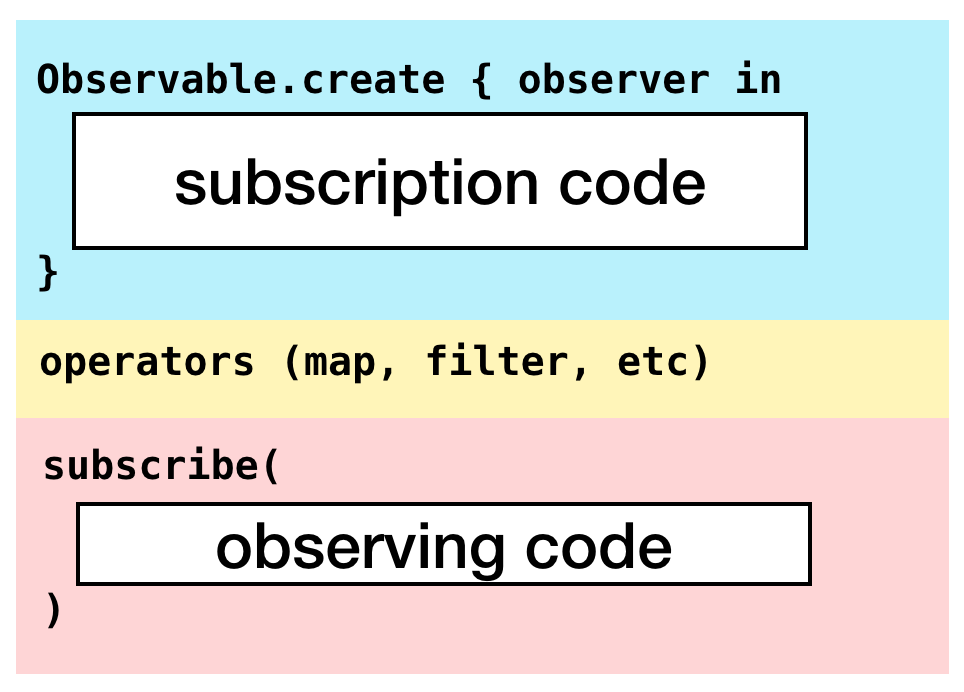
Both subscribe(on:) and observe(on:) can change threads—so what’s the difference?
They affect different parts of the chain. subscribe(on:) affects the subscription side, while observe(on:) affects the observation side:
|  |
Suppose we run the following code on the main thread:
Observable<Int>.create { observer in
    observer.onNext(1)
    observer.onCompleted()
    return Disposables.create()
}
.subscribe(on: ConcurrentDispatchQueueScheduler(qos: .background))
.observe(on: MainScheduler.instance)
.subscribe(onNext: { /* ... */ })
The rough flow is: after subscribing on the main thread, we switch to a background queue to execute the create closure, then switch back to the main thread for the onNext closure. The order of subscribe(on:) and observe(on:) does not affect the resulting behavior here.
At this point you might wonder: what about the operators in the middle of the chain? Do they get affected by these APIs? Yes, they do.
If you only use subscribe(on:), the entire chain runs on the specified scheduler. And if you have multiple subscribe(on:) calls, only the first one takes effect—this is clear from the SubscribeOn source. For example:
Observable<Int>.create { observer in
    observer.onNext(1)
    observer.onCompleted()
    return Disposables.create()
}
.subscribe(on: ConcurrentDispatchQueueScheduler(qos: .background))
.subscribe(on: MainScheduler.instance)
This is roughly equivalent to:
MainScheduler.instance.schedule(1) { number in
    ConcurrentDispatchQueueScheduler(qos: .background).schedule(number) { innerNumber in
        // ...
    }
}
You can see that the subscription ultimately runs on ConcurrentDispatchQueueScheduler(qos: .background).
observe(on:) behaves differently. Each time you encounter an observe(on:), everything downstream of it runs on that scheduler. For example:
Observable<Int>.create { observer in
    observer.onNext(1)
    observer.onNext(2)
    observer.onCompleted()
    return Disposables.create()
}
.observe(on: ConcurrentDispatchQueueScheduler(qos: .background))
.map { $0 + 1 }
.filter { $0.isEven }
.observe(on: MainScheduler.instance)
.map { $0 + 1 }
.filter { $0.isEven }
.subscribe(onNext: { /* ... */ })
In this example, the first pair of map and filter closures are invoked on a background queue, while the second pair and the final subscribe(onNext:) are invoked on the main thread. The create closure still runs on the current thread where subscribe is called.
Summary
In this article we walked through the Scheduler-related code in RxSwift. I have to say, reading RxSwift’s source can be quite challenging: you often have to jump back and forth between multiple files to fully grasp what’s going on, and the design is quite abstract. This time, however, I tried not to get stuck on every single class or method. If I don’t immediately understand an implementation, it’s okay—as long as I understand what it does, I can continue reading the code that depends on it. That mindset made things feel much less painful than last time.
RxSwift is a framework I use heavily at work, but knowing only how to use it isn’t enough; we also want to understand why it behaves the way it does. At this point we’ve essentially looked through the core concepts in RxSwift: Observable, Observer, Disposable, and Scheduler, and we now have a more complete understanding of the framework as a whole.