Migrating to init.lua
I finally managed, right before 2022 ended, to migrate my Neovim configuration from vimscript to Lua. This post is a brief write-up of that process.
Preface
Neovim actually added official Lua integration back in 0.5. But my existing config had been stable for a long time, and early on the Lua API was not very complete. Some parts were unstable and kept changing, so I never really felt the urge to tinker with it.
That is, until not long ago when folks in a Vim group were talking about a new plugin manager from the community: lazy.nvim. It was getting a lot of praise, and the packer.nvim I was using no longer felt that elegant. So I thought I might as well migrate to lazy. Then I figured, since I was migrating anyway, why not go all the way and switch everything to Lua? And that’s how this post came to be.
After Neovim officially promoted Lua to a first-class scripting language, users could write their configuration in Lua. The entry point of such a configuration is the init.lua file, which is the Lua equivalent of Neovim’s old init.vim and Vim’s .vimrc.
Of course, Neovim still supports vimscript, so you can continue to use init.vim and even call Lua code from there. (In fact, for a long time my config used a heredoc inside init.vim to configure Lua plugins.) For example:
" Run Lua code via the :lua command
:lua --lua code here

" Run Lua code via a heredoc
lua <<EOF
-- lua code here
EOF
The official Neovim docs and community resources offer detailed guides for progressive migration, such as:
If you’re planning a migration yourself, these are great starting points.
A Brand-New Setup
While migrating to Lua, I refactored my config files from a single file into the following structure:
>>> tree ~/.config/nvim/
~/.config/nvim/
├── init.lua
└── lua
   ├── commands.lua
   ├── mappings.lua
   ├── options.lua
   ├── plugin.lua
   ├── theme.lua
   ├── plugins
   └── utils
All the configuration lives under the lua directory, where:
commands.luacontains generalautocmdand related settingsmappings.luacontains general key mappingsoptions.luacontains general option settingsplugin.luacontains the plugin manager configurationtheme.luacontains the colorscheme configurationpluginsholds the per-plugin configuration filesutilscontains utility/helper code
init.lua is just a tiny entry file that loads those Lua modules:
require('options')
require('mappings')
require('commands')
require('plugin')
require('theme')
I put theme last to avoid colors being overridden by plugins that load later.
Options
First, the options. Previously, in vimscript, I had:
set background=light
set termguicolors
set updatetime=300
set mouse=a
Now it becomes:
vim.opt.background = "light"
vim.opt.termguicolors = true
vim.opt.updatetime = 300
vim.opt.mouse = "a"
This part is quite straightforward: mostly one-to-one replacements. Most of them are self-explanatory, and if you’re unsure, you can check the Neovim Quick Reference to see what type an option is.
Mappings
Next are the mappings. Neovim’s Lua API is a bit more verbose than vimscript, so I borrowed some code from another config and added some helper functions for mappings:
local M = {}

function M.map(mode, lhs, rhs, opts)
  opts = opts or { silent = true }
  vim.keymap.set(mode, lhs, rhs, opts)
end

function M.noremap(mode, lhs, rhs, opts)
  opts = opts or { noremap = true, silent = true }
  vim.keymap.set(mode, lhs, rhs, opts)
end

function M.exprnoremap(mode, lhs, rhs, opts)
  opts = opts or { noremap = true, silent = true, expr = true }
  vim.keymap.set(mode, lhs, rhs, opts)
end

function M.imap(lhs, rhs, opts) M.map('i', lhs, rhs, opts) end

function M.nmap(lhs, rhs, opts) M.map('n', lhs, rhs, opts) end

function M.vmap(lhs, rhs, opts) M.map('v', lhs, rhs, opts) end

function M.xmap(lhs, rhs, opts) M.map('x', lhs, rhs, opts) end

function M.nnoremap(lhs, rhs, opts) M.noremap('n', lhs, rhs, opts) end

function M.vnoremap(lhs, rhs, opts) M.noremap('v', lhs, rhs, opts) end

function M.xnoremap(lhs, rhs, opts) M.noremap('x', lhs, rhs, opts) end

function M.inoremap(lhs, rhs, opts) M.noremap('i', lhs, rhs, opts) end

function M.tnoremap(lhs, rhs, opts) M.noremap('t', lhs, rhs, opts) end

function M.exprnnoremap(lhs, rhs, opts) M.exprnoremap('n', lhs, rhs, opts) end

function M.exprinoremap(lhs, rhs, opts) M.exprnoremap('i', lhs, rhs, opts) end

return M
This way I don’t have to type vim.keymap.set('n', '', '', { silent = true, noremap = true }) every time. In some cases it’s even more concise than vimscript.
So the original vimscript:
let mapleader = " "

nnoremap <silent>[b :bp<CR>
nnoremap <silent>]b :bn<CR>
inoremap jk <Esc>
becomes:
vim.g.mapleader = " "

local mapping = require('utils.mapping')
mapping.nnoremap("[b", ":bp<CR>")
mapping.nnoremap("]b", ":bn<CR>")
mapping.inoremap("jk", "<Esc>")
Commands
For commands, before Neovim 0.7 there was no dedicated Lua API for user commands or autocommands, so if you wanted to switch to Lua you had to use vim.cmd.
For example, a simple autocmd:
autocmd Filetype lua setlocal ts=2 sts=2 sw=2
would be written as:
vim.cmd([[autocmd Filetype lua setlocal ts=2 sts=2 sw=2]])
vim.cmd is a generic API that can execute arbitrary Vim commands or expressions, but under the hood it involves back-and-forth conversion between Lua and vimscript, which has performance implications.
Fortunately, Neovim 0.7 introduced dedicated APIs, so we can now write:
vim.api.nvim_create_autocmd('Filetype', {
  pattern = 'lua',
  command = 'setlocal ts=2 sts=2 sw=2',
})
Theme
The theme part is simple. The original colorscheme xxx becomes vim.cmd [[colorscheme gruvbox-material]], because as of now Neovim still doesn’t provide a dedicated Lua API for the colorscheme command. It’s still implemented via vim.cmd.
Plugins
Finally, the plugin part. This is the most time-consuming section, and also the main reason for this migration.
Since I started using Vim, I’ve gone through several plugin managers: from Vundle and vim-plug to packer, and now to lazy — each switch involved a fair amount of tinkering.
packer itself is written in Lua and configured via Lua. It supports declarative plugin configuration and lazy loading, which greatly improves Neovim startup time. For a long while, packer was the de facto standard plugin manager once Neovim got Lua support.
But that strength is also its weakness. Lazy-loading plugins with dependencies has long-standing bugs; and anyone who has used packer has probably been bitten by PackerCompile. The author is rewriting v2 and plans to remove compilation entirely.
However, the author of lazy is incredibly prolific and shipped lazy first. Even the packer author submitted a PR with a migration guide from packer to lazy: packer → lazy.
Back to the main topic. lazy itself is simple to use, and it even provides a template configuration as a reference: LazyVim. But since this is a tinkering log, I’ll walk through things step by step.
First, installation:
local lazypath = vim.fn.stdpath("data") .. "/lazy/lazy.nvim"
if not vim.loop.fs_stat(lazypath) then
  vim.fn.system({
    "git",
    "clone",
    "--filter=blob:none",
    "--branch=stable",
    "https://github.com/folke/lazy.nvim.git",
    lazypath,
  })
end
vim.opt.rtp:prepend(lazypath)
This snippet checks at Neovim startup whether lazy is already installed; if not, it clones lazy.
Then we configure lazy. Continuing from the code above, we add:
require("lazy").setup("plugins", {
  defaults = { lazy = true },
  install = { colorscheme = { "gruvbox-material" } },
  checker = { enabled = true },
  performance = {
    rtp = {
      disabled_plugins = {
        "gzip",
        "netrwPlugin",
        "tarPlugin",
        "tohtml",
        "tutor",
        "zipPlugin",
      },
    },
  },
})
lazy’s configuration goes into setup. A few key points:
-
setup("plugins")loads thepluginsmodule (our plugins directory) and its plugin specs. lazy supports writing each plugin’s spec in its own file and then automatically merging them into a single spec list. (With packer, achieving the same effect takes more work.)However, note that the file name cannot be
plugins.lua. Otherwise, after loading the Lua module corresponding to thepluginsdirectory, Neovim will try to loadplugins.luaagain, causing lazy to throwRe-sourcing your config is not supported with lazy.nvimevery time you start Neovim. One solution is to move the plugins directory one level deeper, as the lazy author does — e.g., from~/.config/nvim/lua/pluginsto~/.config/nvim/lua/config/plugins— and then usesetup("config.plugins")to avoid the name clash.Similarly, the file also cannot be named
lazy.lua, orrequire("lazy")will end up in a recursive require and crash. - With
defaults = { lazy = true }, we ask lazy to lazy-load all plugins by default, and override per-plugin as needed. install = { colorscheme = { "gruvbox-material" } }tells lazy which colorscheme to load when you first start Neovim and lazy begins installing plugins. Without this, due to lazy-loading, you might see Neovim’s default colorscheme during the initial install.- lazy can disable built-in runtime path plugins directly; here I disable a few to shave off unnecessary startup time.
- lazy also automatically compiles plugin code to bytecode and caches it to improve Neovim startup time. With packer, you’d need an extra plugin like impatient.nvim to get similar behavior.
lazy has many more configuration options, which you can find in its README.
Once lazy itself is set up, we can configure individual plugins. Let’s take toggleterm.nvim as an example:
return {
  "akinsho/toggleterm.nvim",
  keys = { [[<C-\>]], "<leader>g" },
  cmd = { "ToggleTerm" },
  config = function()
    require("toggleterm").setup({
      open_mapping = [[<c-\>]],
      direction = "float",
      shade_terminals = false,
    })
  end,
}
toggleterm’s spec and configuration live in a single file:
keysspecifies that the plugin should load only when I pressCtrl-\or<leader>g. This is something packer doesn’t support yet. Besides passing simple strings or string arrays,keyscan also define mappings inline; see the README for details.- Like packer, lazy supports loading plugins based on commands, events, or
filetype, for example:cmd = "ToggleTerm"loads the plugin when theToggleTermcommand is executed.event = "BufReadPre"loads the plugin on theBufReadPreevent.ft = "qf"loads the plugin when thefiletypeisquickfix.
For simple, configuration-free plugins, there’s no need to give each one its own Lua file; we can group them in a single file:
return {
  {
    "honza/vim-snippets",
    event = "InsertEnter",
  },

  {
    "Raimondi/delimitMate",
    event = "InsertEnter",
  },

  {
    "tpope/vim-repeat",
    keys = ".",
  },

  {
    "wellle/targets.vim",
    event = "BufReadPost",
  },
}
In the end, lazy merges all these specs into one, giving us a very flexible way to declare and configure plugins.
Once everything’s in place, we can start using lazy.
On the very first run, when you open Neovim, you don’t have to do anything: lazy will install itself automatically, then pop up its UI and start installing all your plugins:
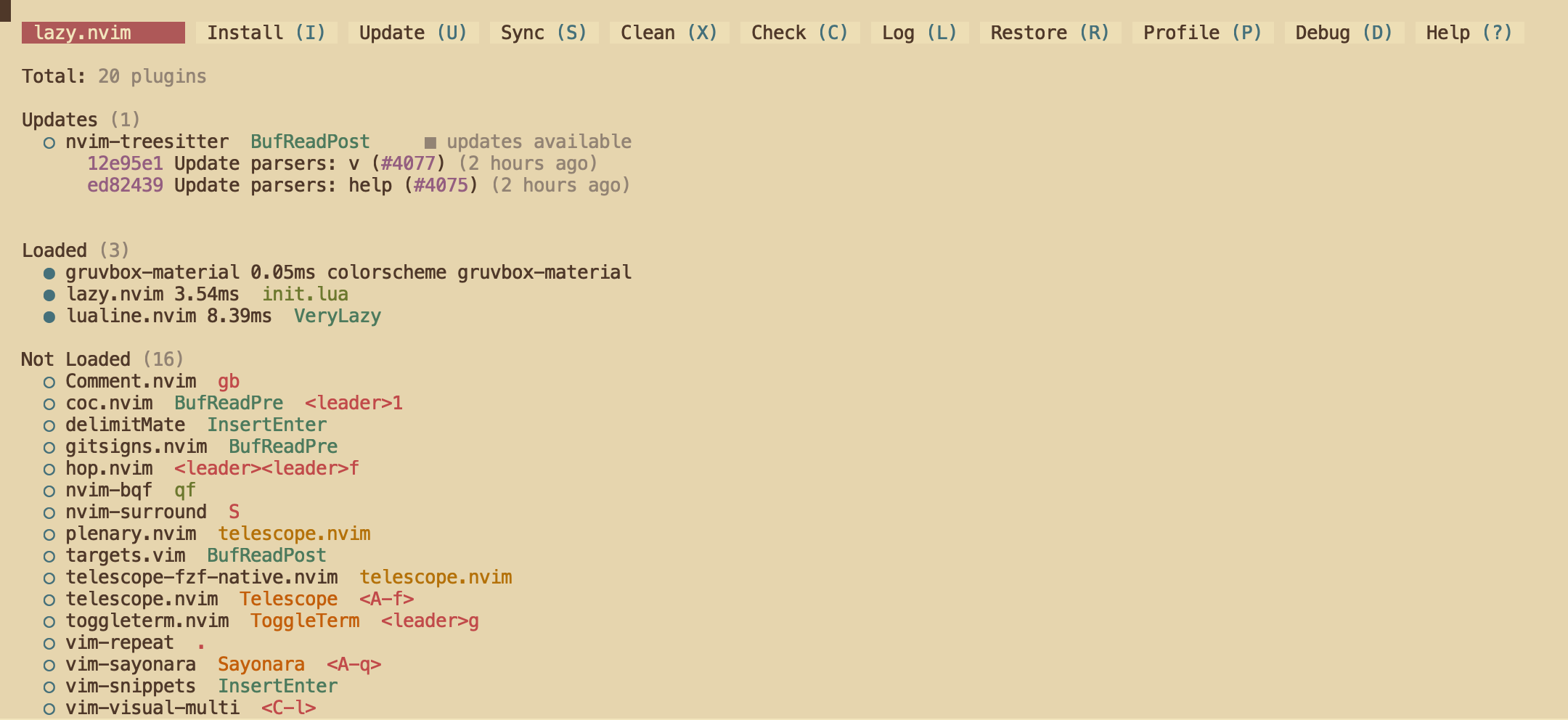
You can see that out of my 20 plugins, only 3 are loaded at startup; the rest are still unloaded, and the UI also shows what triggers each plugin to load.
Afterwards, if you want to bring up lazy manually, just run the :Lazy command.
lazy also has a profiling feature that shows a more accurate Neovim startup time and the load times of individual plugins:
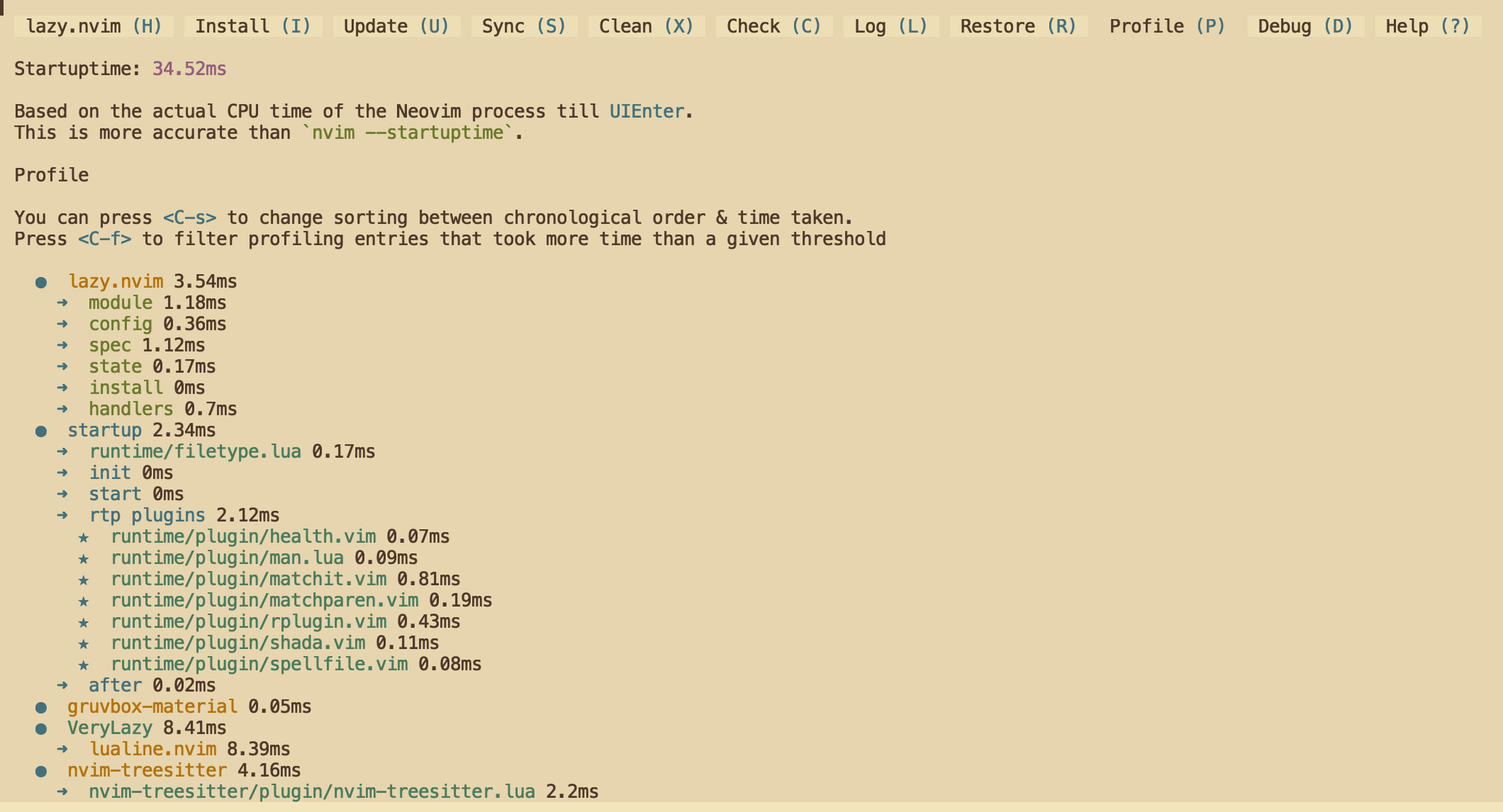
Thanks to lazy, my startup time dropped straight down to 35ms.
Mission accomplished! rm init.vim!
Last but not least, tinkering with configuration is a real time sink. I spent more than two full days on this, googling and reading docs, but in the end the migration was a success. Hopefully this post can be of some help to you as well.
References
- New features in Neovim 0.5
- Lua-guide - Neovim docs
- nanotee/nvim-lua-guide: A guide to using Lua in Neovim
- miltonllera/neovim-config: A Neovim setup using Lua
- Everything you need to know to configure neovim using lua | Devlog
- [FEATURE] expose Lua API equivalent of
:colorscheme· Issue #18201 · neovim/neovim - folke/lazy.nvim: 💤 A modern plugin manager for Neovim
- lazy.nvim is amazing! : neovim